In ETO we only enrol the HIPPY child. If you forget to change the Program Enrollment information from Everyone to the name of the HIPPY child you will enrol the child and their parent(s). This is a common error that is easily fixed.
You can see if you have accidentally enrolled a parent-carer by running a search of the Participant list and scanning dates of birth. Parent-carers will show up as having earlier birth dates than enrolled children
If you accidentally enrol a parent-carer this can be easily fixed by:
- Contacting ETO Support and asking them to dismiss the parent OR
- Dismissing them from ETO yourself.
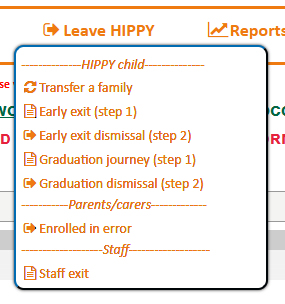
Go to HIPPY Delivery Dashboard -> Leave HIPPY -> Parent/Carers -> Enrolled in error.
Step 1: On the Dismiss Participants from HIPPY Delivery Dashboard page, enter the parent-carers first or last name and select Search
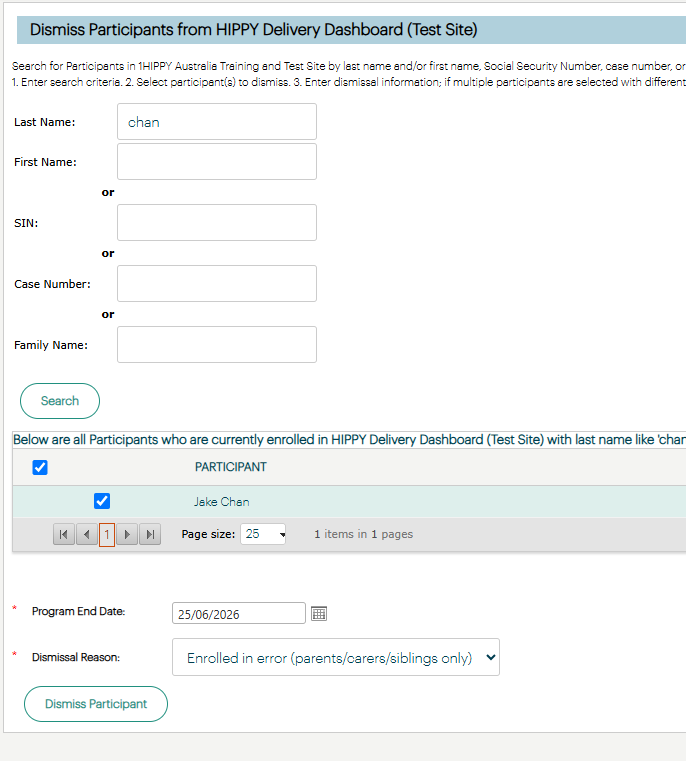
Step 2: Select the parent- carer you want to dismiss by checking the box next to their name
Step 3: Select the Dismissal date
Step 4: In Dismissal Reason select Enrolled in error (parent/carers/siblings only) from the drop down box
Step 5: Select Dismiss Participant
Was this article helpful?
That’s Great!
Thank you for your feedback
Sorry! We couldn't be helpful
Thank you for your feedback
Feedback sent
We appreciate your effort and will try to fix the article