How do I know if a child/staff member is no longer active?
One way to determine if a particular child or staff member is no longer active is to try and take a Touchpoint (e.g. Home Visit or Staff Demographics Review). If they don’t show up in the list of children/staff, then they are not active. Children become inactive after you complete the early exit or graduation process while staff members become inactive after submitting a Staff Exit Touchpoint.
Taking a Touchpoint against an inactive child or staff member.
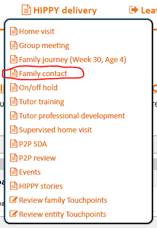
1. Start off by selecting the particular Touchpoint you want to take from the Dashboard menu (as you normally would for an active child/staff member).
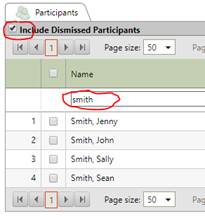
2. The list of children or staff members you are then presented with will only consist of those that are currently active. To include any inactive children or staff members, select the checkbox in the top-left corner of the list.
3. If you are wanting to record a Touchpoint against an inactive child, the label on the checkbox will say ‘include dismissed participants’. However, it will say ‘include dismissed entities’ if you are wanting to record data against a dismissed staff member.
4. Keep in mind that when you tick this box, every single active and inactive family member (including parents/carers) or staff members will be shown in this list. It will probably be too hard to go through each page of the list to find the person you are looking for so to make finding them easier, type part of their name (first or last) into the filter bar at the top of the Name column. When the list is filtered down, select the particular person you want to take the Touchpoint against and select ‘continue’.
Then proceed to complete the Touchpoint as your normally would.
Still need more help?
If you need more help with this process, please contact the ETO Helpdesk for more information.
Was this article helpful?
That’s Great!
Thank you for your feedback
Sorry! We couldn't be helpful
Thank you for your feedback
Feedback sent
We appreciate your effort and will try to fix the article