When a new Line Manager, Coordinator, or Tutor commences employment with HIPPY, the “Add a staff member” touchpoint is used to add the staff member to ETO. Unlike other touchpoints, it doesn’t need to be recorded against a Family or other entities/outcomes.
In the HIPPY Delivery Dashboard menu, select Join HIPPY > Add a staff member.
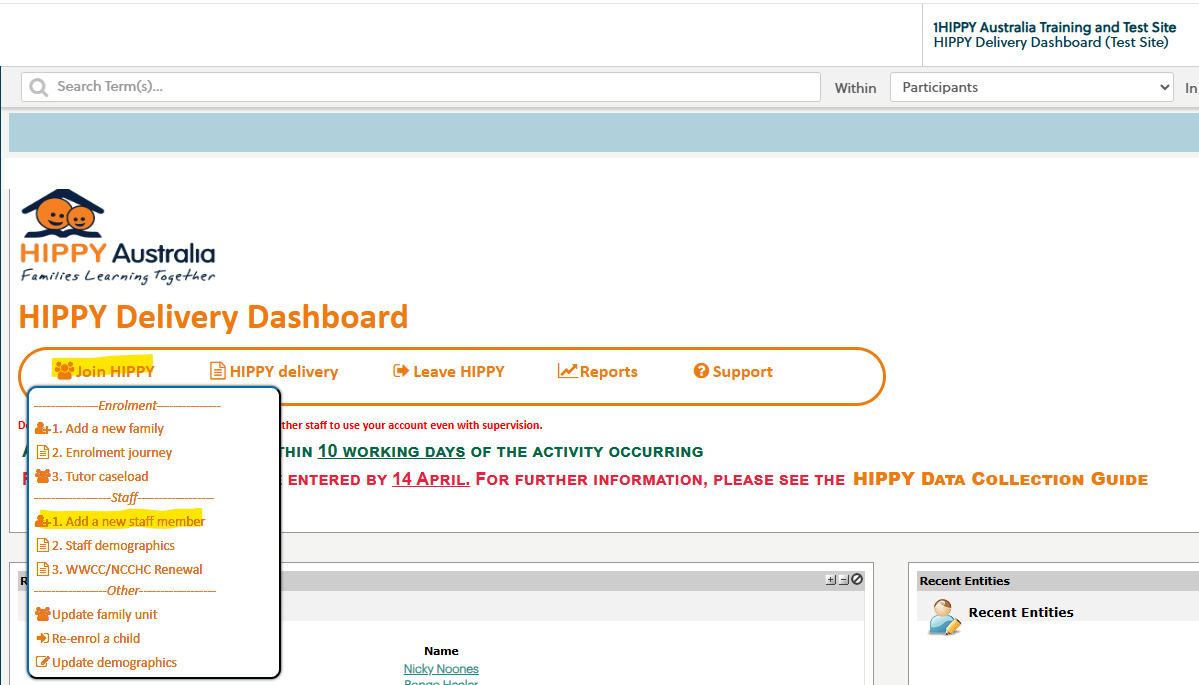
Complete the touchpoint by entering the staff member’s organisational email address and details of their compliance checks (Working with Children Check - WWCC/Nationally Coordinated Criminal History Check - NCCHC).
If either compliance document is unavailable at the time of entry, delay submitting this touchpoint until both are ready for upload. Depending on individual organisational policy, these checks may be submitted in one of the following ways:
- Upload to “Add a staff member” touchpoint (these files will be deleted from ETO once processed, and are only accessible to ETO Support)
- For existing staff members who need to renew their compliance checks, Coordinators and Line managers can upload these items to the ‘WWCC/NCCHC renewal’ touchpoint (these checks will be deleted from ETO once processed and are only accessible to ETO Support)
- Upload to a designated secure portal by the Coordinator, Line Manager, your organisation’s HR team, or the staff member
Once the touchpoint has been submitted and all checks have been received, ETO Support will create a staff entity. This enables data to be recorded against the staff member.
For Coordinators and Line Managers, an ETO login will also be provided. All staff members will receive an email containing their LMS login details.
Was this article helpful?
That’s Great!
Thank you for your feedback
Sorry! We couldn't be helpful
Thank you for your feedback
Feedback sent
We appreciate your effort and will try to fix the article