Part 1: Logging into ETO for the first time
1A: Logging in
Every user of ETO needs to have their own login. It is important to keep your login confidential for the following reasons:
- Privacy and confidentiality of families and staff
- Accurate measurement of workload
- Protecting your good work
If someone else needs access to ETO, please contact HIPPY Australia to discuss further.
Go to https://secure.etosoftwareau.com/NewLogin.aspx
Enter details as follows:
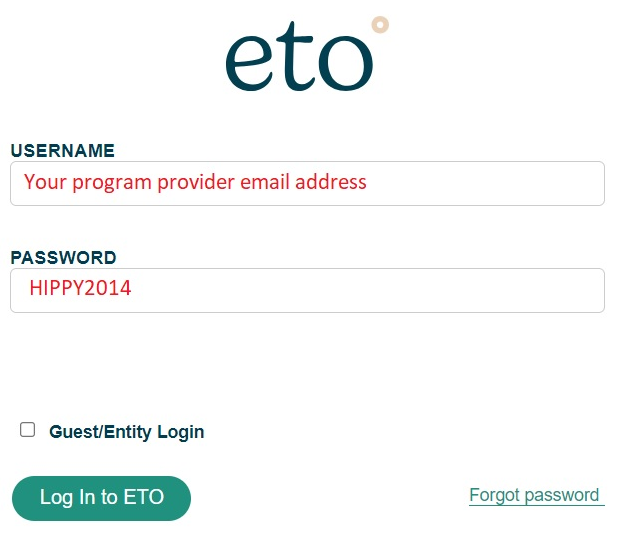
Select Log in to ETO
1B: Confirming your ETO profile
Profile information required:
- First Name
- Last Name
- Postal Code: ‘T4N 1R3’
- Email address
- Your time zone
- Accept the terms of use
- Enter and confirm a new password (minimum of 8 characters)
postcode
Part 2: Changing your ETO password
On the top right-hand side of screen, click on your name. Click on ‘Change my password & security questions’.
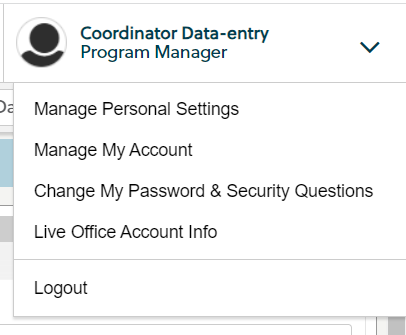
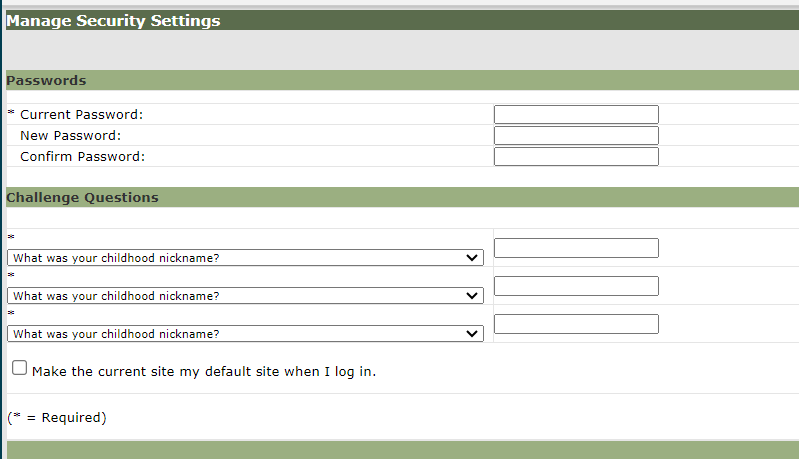
- Enter in your current password.
- Create a new password (minimum of 8 characters)
- Set your own security questions.
- Save the changes.
Was this article helpful?
That’s Great!
Thank you for your feedback
Sorry! We couldn't be helpful
Thank you for your feedback
Feedback sent
We appreciate your effort and will try to fix the article