During review of Family Pack Delivery, there may be instances of 'multi' listed on the report in black.
This indicates that there are multiple instances of pack deliveries entered against a participant.
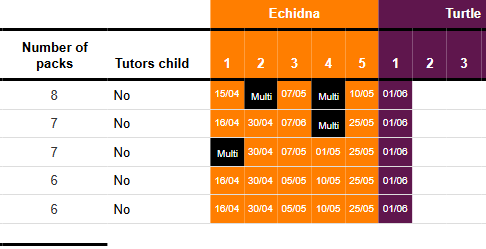
This needs to be resolved by the ETO Support Team if these entries fall outside of the current reporting period.
Take note of the participant name and the pack deliveries where 'multi' is listed.
1) Go to the delivery tab
2) Use the filter option to filter on the participants name
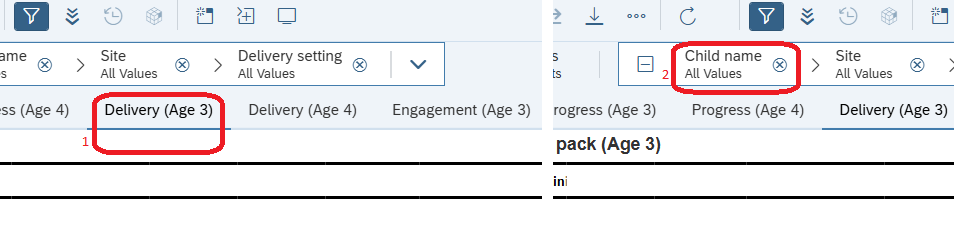
Tip: exporting the file to excel can allow for more flexibility when it comes to sorting data.
3) The participant's pack delivery will now be displayed and you can find details of the duplicate packs that have been entered.
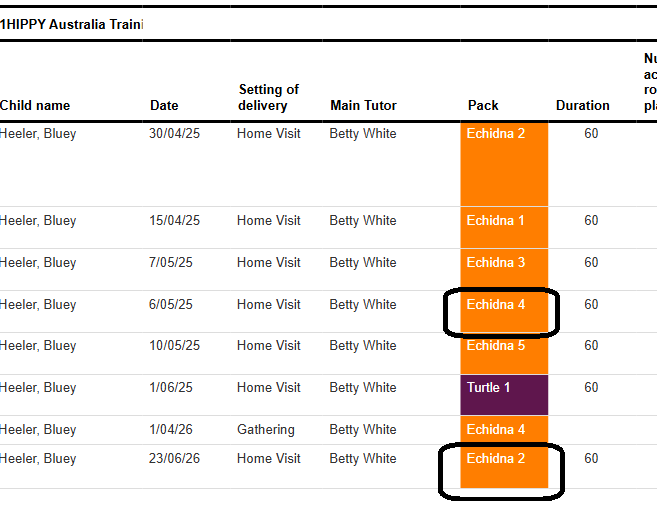
4) Submit a ticket via the HIPPY Support Portal to request that the duplicate entries be deleted from ETO. Please include the following information:
- Participant's name
- Date(s) of entry
- The pack name(s) that need to be deleted from ETO
Was this article helpful?
That’s Great!
Thank you for your feedback
Sorry! We couldn't be helpful
Thank you for your feedback
Feedback sent
We appreciate your effort and will try to fix the article